Building SQLite Viewer Pro: Why I Built My Own SQLite Extension for VS Code
The story behind building SQLite Viewer Pro, a lightweight Visual Studio Code extension for exploring SQLite databases without leaving the editor.
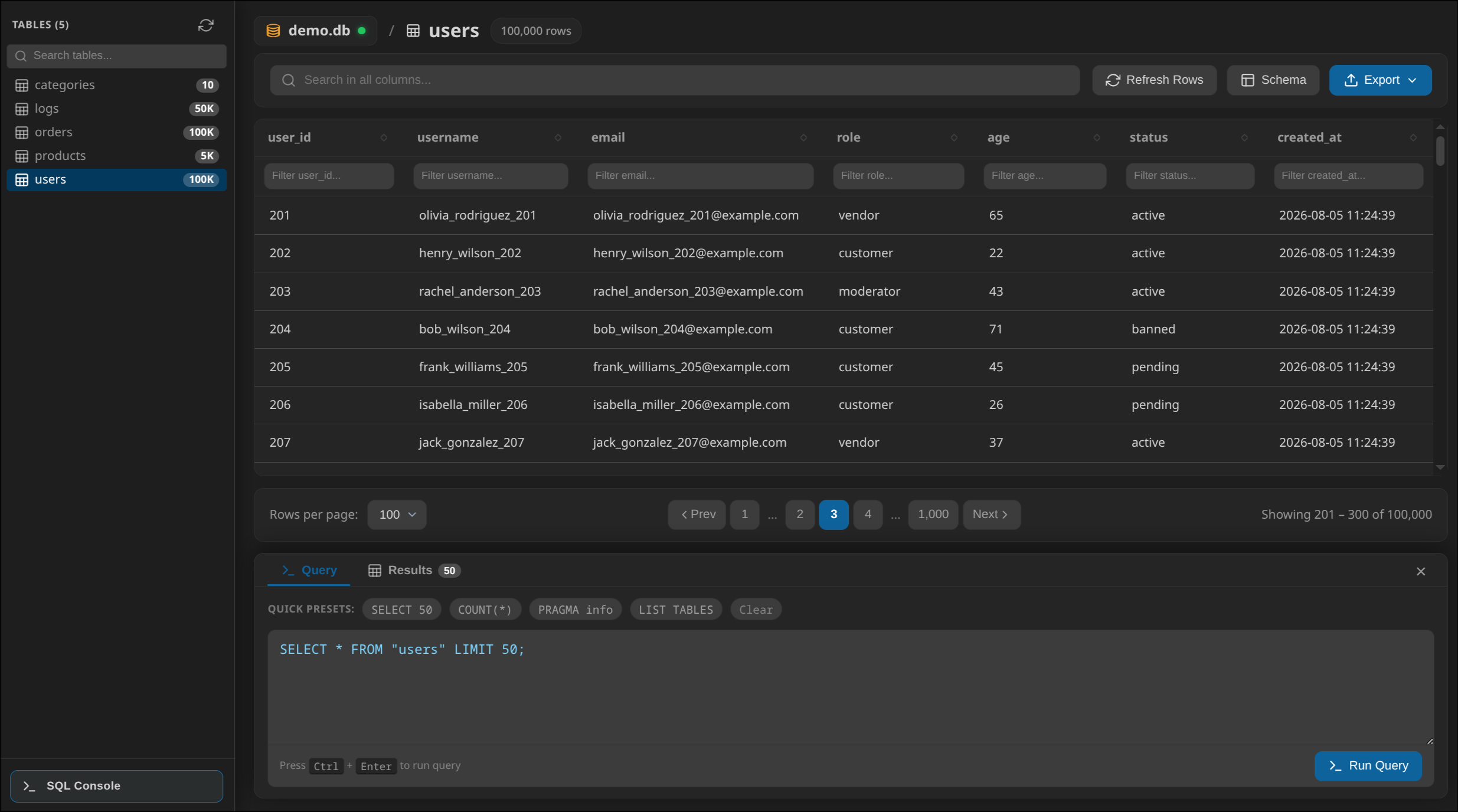
Building SQLite Viewer Pro: Why I Built My Own SQLite Extension for VS Code
If you work with SQLite long enough, you'll eventually end up opening the same database over and over again.
Maybe it's a local development database from a FastAPI project. Maybe it's generated by a mobile application, a desktop app, or a test environment. Whatever the source is, the workflow usually looks the same:
- Find the
.sqlitefile. - Open another application.
- Browse tables.
- Go back to VS Code.
- Repeat.
After doing this hundreds of times, I started wondering why I had to leave my editor just to inspect a database.
That simple question eventually became SQLite Viewer Pro.
The goal wasn't to build another database client. It was to remove unnecessary context switching from my daily workflow.
The Problem
There are already plenty of SQLite tools.
Some are desktop applications. Others are VS Code extensions.
Most of them worked... but none of them really fit the workflow I wanted.
Some required installing the SQLite CLI.
Some opened databases in a very basic table.
Others felt slow when browsing larger databases.
A few looked abandoned.
Instead of trying to adapt my workflow around those tools, I decided to build one that matched how I actually inspect databases during development.
Designing for Everyday Use
I wasn't trying to compete with DBeaver or DataGrip.
Those are excellent tools.
But when all I need is to quickly answer questions like:
- "What's inside this table?"
- "Did this migration work?"
- "What does this record look like?"
- "How many rows are there?"
Launching a full database client feels unnecessary.
SQLite Viewer Pro is built around those small, repetitive tasks that happen dozens of times every day.
No Native Dependencies
One decision I made very early was that I didn't want users to install anything.
No SQLite executable.
No external binaries.
No platform-specific setup.
Instead, the extension uses sql.js, which is SQLite compiled to WebAssembly.
That means the database runs entirely inside the VS Code WebView.
The extension simply reads the database file into memory and lets SQLite do the rest.
It works the same way on Windows, macOS and Linux.
How It Works
The extension is split into two independent parts.
VS Code Extension Host
        │
        │
        ▼
 Reads SQLite file
 Handles exports
 Opens custom editor

        │
        ▼

 WebView

 • WebAssembly SQLite Engine
 • Table Viewer
 • SQL Console
 • Schema Explorer
 • Export UI
The Extension Host handles everything VS Code is responsible for.
The WebView focuses entirely on rendering the interface and executing SQL queries.
Keeping these responsibilities separate made the project much easier to maintain as more features were added.
Opening Databases Like Any Other File
One feature I wanted from day one was making database files behave like normal files inside VS Code.
Instead of opening a binary preview, clicking a .sqlite, .db, or .sqlite3 file launches a dedicated editor with the complete interface ready to use.
It feels like a natural part of VS Code instead of an external tool.
Building the Interface
One thing I quickly learned was that viewing database tables sounds much easier than it actually is.
Large datasets introduce a surprising number of UI challenges.
For example:
- tables need smooth scrolling
- columns should be resizable
- sorting should be fast
- dark mode should work automatically
- large text values shouldn't break layouts
Most of the development time wasn't spent writing SQL.
It was spent polishing these small interactions so the extension feels responsive instead of frustrating.
The Built-in SQL Console
Sometimes browsing tables isn't enough.
You need to run a quick query.
Instead of opening another application, I added a lightweight SQL console directly into the extension.
It supports everything SQLite supports:
SELECT *
FROM users
WHERE created_at >= date('now', '-7 day');
I also added execution timing and row counts because they're useful when you're experimenting with queries.
Nothing revolutionary.
Just information I kept finding myself looking for.
Exporting Data
During development I often needed to share data with teammates or inspect it elsewhere.
So exporting became a built-in feature.
Current query results can be saved as:
- CSV
- JSON
- SQL
No copy-pasting.
No external conversion tools.
Just export the current result and continue working.
What Was Harder Than Expected
Building the extension taught me that the difficult parts are rarely the ones you expect.
Using WebAssembly wasn't particularly difficult.
The harder problems were things like:
- synchronizing communication between the Extension Host and the WebView
- handling large database files without freezing the UI
- making the interface feel native inside VS Code
- keeping memory usage reasonable
- supporting different editor themes without custom styling for each one
Those details don't appear in screenshots, but they make a huge difference in everyday use.
What I Learned
This project changed the way I think about developer tools.
Developers don't necessarily need software with hundreds of features.
They need software that removes friction.
If something saves five seconds and you do it fifty times a day, that's already valuable.
That idea guided almost every design decision in SQLite Viewer Pro.
Whenever I considered adding a feature, I asked myself one question:
Would I actually use this every week?
If the answer was no, it usually didn't make it into the extension.
Open Source
SQLite Viewer Pro is open source and continues to evolve based on real-world usage.
Every feature started because I encountered the same annoyance repeatedly while working on backend projects.
Rather than accepting those small interruptions, I turned them into an extension that now helps other developers inspect SQLite databases without ever leaving VS Code.
If you're curious about the implementation or want to contribute, you can find the source code on GitHub.